
Google Docs Integration
One of the first challenges I encountered at Enty was implementing online editing for complex legal contracts.
Clients needed to edit template-generated agreements directly in the browser. Initially, the team attempted a "brute-force" approach: converting PDFs to HTML, editing them in an open-source WYSIWYG editor, and converting them back. This led to a dead end: layouts broke ("drifted"), and fonts or margins in the final document failed to meet legal standards.
I conducted a technical audit and halted the development of this doomed approach, proposing a strategic alternative.
💡 The Solution: Don't Reinvent the Wheel
I demonstrated to the business and the team that replicating a Microsoft Word-level rendering engine with a small team is unrealistic. Open-source solutions (like CKEditor or Quill) are built for web content, not for paginated documents requiring print precision.
Instead of wrestling with PDFs, I identified that the business already stored the source documents in DOCX format. This allowed for a paradigm shift: Instead of building a custom buggy editor, we integrated the best cloud office suite available — Google Docs.
⚙️ Architecture
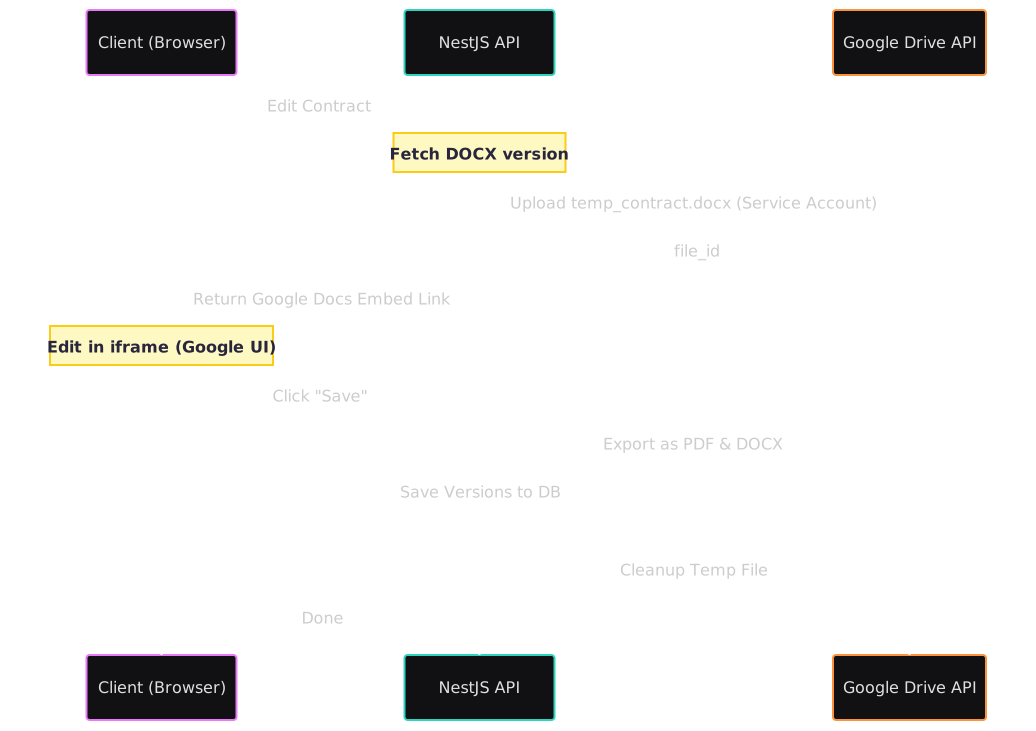
I designed and implemented a "seamless" flow, abstracting the integration complexity from the end user:
- Tunneling: The selected DOCX source file is silently uploaded to a restricted Google Drive folder via a Service Account.
- Editing: Google Docs opens in an embedded iframe on the frontend. The user sees a familiar interface and perfect pagination.
- Synchronization: Upon clicking "Save," the system retrieves the file, converts it to a clean PDF for printing, and stores the updated DOCX for future edits.
💎 Results
- Perfect Layout Consistency: 100% WYSIWYG accuracy matching print standards, which was impossible to achieve with custom web editors.
- UX: Users received a familiar, professional interface without a learning curve.
- Multi-format Support: Leveraging the Google engine gave us "free" out-of-the-box export capabilities for PDF, DOCX, Markdown, and HTML.
- Cost Efficiency: Implementation took days instead of months of fruitless attempts to build a proprietary text processor.